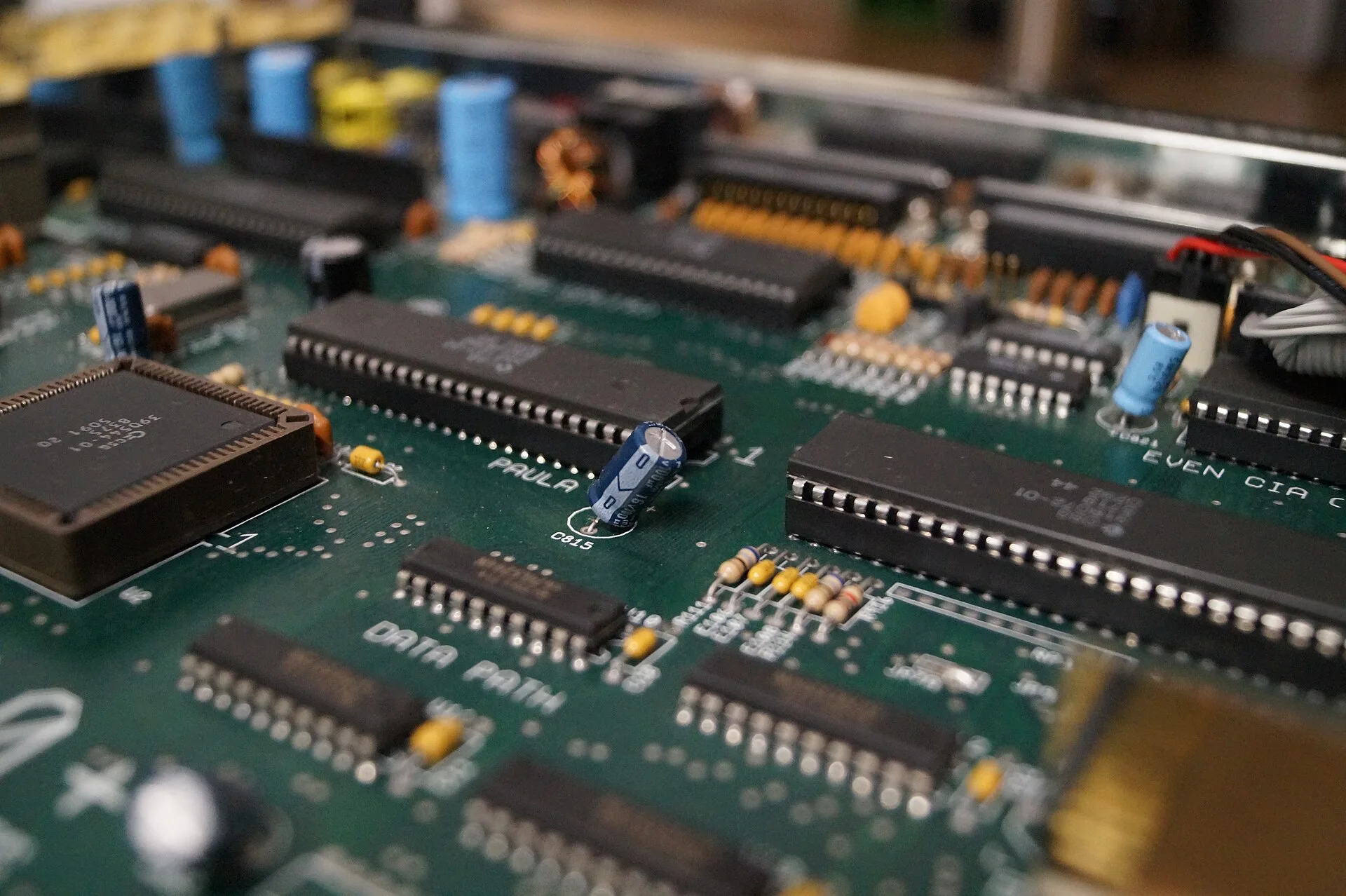
Why does an Amiga 500 sometimes run its 68000 more slowly than the clock rate suggests? Because the processor shares its memory with the graphics, sound and disk hardware, and the sharing runs to a timetable. Each horizontal line of the display is cut into 227.5 slots of about 280 nanoseconds, and who gets which slot is largely settled before the CPU is asked.
A note on method. This is a read-through of the Amiga Hardware Reference Manual, Wikipedia’s articles on the Original Chip Set, Amiga Chip RAM and the Amiga 500, and the figures they quote. It is not a log from an A500 on my own bench. The photo at the top is an Amiga 500 Plus board, the later model, chosen because the chips and their silkscreen are easy to read.
What is on the Amiga’s one memory bus?
The A500 launched in 1987 at £499 in the UK and $699 in the US, according to Wikipedia, which also reports 2.6 million sold and calls it Commodore’s best-selling model. Inside is a Motorola 68000 running at 7.09379 MHz on PAL machines and 7.15909 MHz on NTSC machines, plus 512 KB of RAM that Wikipedia gives as having a 150 nanosecond access time. That RAM is shared. The manual says the three custom chips, Paula, Agnus and Denise, each hold the logic for a particular job such as video, audio or I/O, and because they have DMA they can reach memory without using the CPU.
Agnus is the one that matters here. Wikipedia’s Original Chip Set article calls it the central chip, controlling all access to shared RAM from the 68000 and the other custom chips through a priority system. It also holds the Copper and the Blitter. Denise handles video output and Paula handles audio, the floppy and the serial port. All of them queue at Agnus.
How is a line of video divided up?
The manual puts it plainly. During a horizontal scan line of about 63 microseconds there are 227.5 colour clocks, or memory access cycles, and each is about 280 nanoseconds long. Of those, 226 are available to be allocated. The fixed allocations are 4 cycles for memory refresh, 3 for disk DMA, 4 for audio DMA at two bytes per channel and 16 for sprite DMA at two words per channel. Bitplane DMA, the cycles that fetch the picture itself, takes up to 80, in even or odd slots depending on the size of the display.
Denise, per Wikipedia, handles one to five bitplanes for 2 to 32 colours from a palette of 4,096, plus six-bitplane modes such as HAM and EHB, and every extra bitplane is another stream of data to fetch. Add up the fixed allocations and they come to 107 of the 226 slots when everything is running, which is my arithmetic, not the manual’s. The rest go to the processor, the Copper and the Blitter. The picture is not constant. A screen with more bitplanes needs more slots to draw, and the manual ties the bitplane figure to the size of the display, so it is not a fixed cost.
Why does the 68000 only get half the cycles?
Because it only needs half. One period of the 7.09379 MHz clock is about 141 nanoseconds, so a 280 nanosecond colour clock is two of them, which is my arithmetic. The manual says the 68000 uses only the even-numbered memory access cycles. Since it needs the chip memory bus only on alternate clock cycles to run at full speed, the other cycles are free for other work, and giving it the evens makes it appear to the 68000 that it has the memory all of the time.
It is a good arrangement. A processor that thinks it owns the bus never has to learn that it does not, and it is how a £499 computer got a video system that fetched its own data while the CPU ran a program. I admire it. The catch is in the word ‘appears’: the 68000 only keeps that illusion while the custom chips leave it enough even cycles.
How cheap are sound and sprites on the bus?
Very cheap. The manual’s list gives audio 4 cycles a line, at two bytes per channel, and Paula has four DMA channels. Wikipedia gives each 65 volume levels. Sample rates run from about 20 a second to almost 29,000. Four slots of 280 nanoseconds a line is the whole price of four-channel sound.
Sprites follow the same logic. Wikipedia says the chipset draws eight 16-pixel sprites per scanline, and the manual’s 16 sprite cycles are two words for each of eight channels. That matches, though the match is my arithmetic. It shows how tightly the slot table was drawn: every hardware feature has a slot waiting for it, and the 68000 gets what is left.
What happens when the custom chips want more?
The processor loses cycles. Wikipedia’s article on Amiga Chip RAM says demanding operations such as high-resolution graphics, the Copper or the Blitter can consume the spare cycles and block the CPU’s access to chip RAM. It adds that CPU-only Fast RAM is not affected. That is the point of Fast RAM: it is memory only the CPU uses, so nobody else is queuing for it.
In practice, the same program can run at different speeds depending on the screen it shares a bus with and on how hard the Blitter is working. A plain display leaves the CPU plenty. A busy one leaves it fewer. I am reasoning from the slot table here, not from a benchmark, and I have not found a published figure I would trust for how much slower.
The Copper is a small processor that watches the video beam and changes chip registers at set positions. Wikipedia lists its three instructions: MOVE writes a 16-bit value to a chip register, WAIT halts until the beam reaches a position and SKIP skips an instruction on a condition. Because the Copper steps along with the display, it can change the palette mid-frame, which is how raster bars and reused sprites are done. Wikipedia’s chip RAM article lists it among the things that eat spare cycles.
What does the Blitter do to the CPU?
The Blitter copies and manipulates rectangular blocks of memory. Wikipedia says it works on blocks up to 1024 by 1024 pixels with per-pixel logic operations and barrel shifting, and that it also draws lines using Bresenham’s algorithm and fills areas. It is quick because it is hardware, and it takes its cycles from the same pool as everything else.
The manual gives the rule that decides who wins. When the DMAF_BLITHOG flag is set, the Blitter keeps the bus for every available chip memory cycle. When the flag is clear, the DMA manager monitors the 68000’s requests, and if the processor goes unsatisfied for three consecutive cycles, the Blitter releases the bus for one. The Blitter gets nearly everything it wants by default, and the CPU is guaranteed a turn only after waiting through three.
I like this rule. A hard limit on how long the CPU can be starved is what you write when the machine has to stay responsive without handicapping the graphics hardware. It also means blit speed and program speed trade against each other in a way a programmer can measure.
What is ‘slow RAM’ on an A500?
The A501 trapdoor expansion added 512 KB at address $C00000, and the name for it varied. Wikipedia’s Amiga 500 article calls it Slow RAM or pseudo-fast RAM. The Amiga Chip RAM article explains the catch: early trapdoor expansions of this sort stayed under Agnus’s control, with the same limitations as chip RAM. The extra memory was real. It did not get the CPU out of the queue.
The expansion did what it said. A customer who wanted a faster computer, though, got more of the same shared memory. Fast RAM was the upgrade that took the CPU out of the contention, and it was a different product.
How much memory could the chips reach?
The original Agnus addresses 512 KB of chip RAM. The manual says the Fat Agnus of the later ECS chip set, the 8372A, can address up to one megabyte of chip memory, and that in the A3000 the ECS can reach two. More chip RAM means more room for pictures and samples, but all of it still lives behind Agnus and its timetable.
What is the verdict on the Amiga 500’s bus?
I think it is one of the best-judged compromises of its decade. One shared bus, one timetable and a rule to stop the Blitter bullying the CPU gave Commodore a multimedia machine at £499. The cost sits in two places. The processor slows when the picture asks for more, and the memory expansion that sounded like a cure was another seat at the same table. If you are speccing an A500 today, the number on the memory board matters less than which side of Agnus it sits on.