
UNDER THE LID
Under the Lid: Commodore VIC-20
The Commodore VIC-20 motherboard, chip by chip. Board revision: Assy 250403, Rev. D (PAL).
This is the board from George's own PAL VIC-20, photographed during its restoration. Each chip's notes link to the datasheets and sources they were checked against.
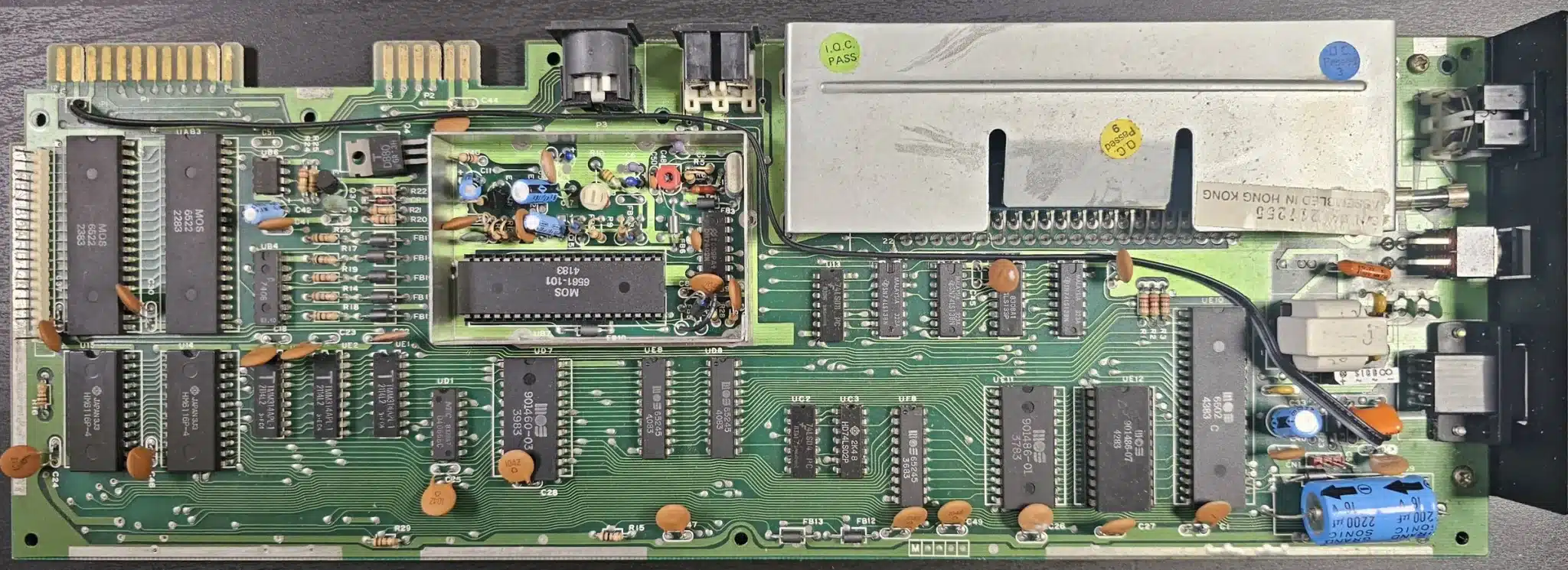
What each chip on the Commodore VIC-20 board does
UE10 MOS 6502 Microprocessor (CPU)
The 8-bit processor that runs every program on the machine. It reads its instructions from the ROMs and RAM over a shared 8-bit data bus. The 6502 family was made by MOS Technology and second-sourced by several makers.
Key specs
- Data bus
- 8 bits
- Address range
- 64 KB (16-bit address bus)
- Instructions
- 56
- Supply
- single +5 V
- Package
- 40-pin DIP
- Speed grades
- 1 MHz plain, 2 MHz "A" suffix (MOS data sheet)
Typical failure symptoms
- Blank screen at power-on.
- Programs run for a while, then freeze (partial failure).
Replacement parts
- Another NMOS 6502 or 6502A (MOS, Rockwell, Synertek): same pinout; the A version is a faster grade and works at the slower clock
Check before fitting: confirm the part against your own board, its revision and the datasheet. A wrong part can damage the board.
Datasheets
- MOS 6500 microprocessors, March 1980 (opens in a new tab) checked 2026-10-20
Sources: MOS 6500 microprocessors data sheet, March 1980; MOS Technology 6502, Wikipedia; VIC-20 Troubleshooting, Retro Isle
UB7 MOS 6560 (NTSC) / MOS 6561 (PAL) Video Interface Chip: picture, sound and paddle inputs
Generates the whole picture and the sound. The 6560 makes an NTSC (American) picture and the 6561 a PAL (European) one; otherwise they do the same job. It also reads paddles and a light pen.
On this board: MOS 6561-101 (PAL) on this board, inside the video shield.
Key specs
- Colours
- 16
- Sound
- three tone generators plus a white-noise generator
- Analogue inputs
- two 8-bit A/D converters (paddles)
- Light pen
- supported
- Address space
- 16 KB
- Package
- 40-pin DIP
Typical failure symptoms
- White or blank screen, or garbage characters.
- Dark or smeared picture, or colours missing (partial failure).
- Garbled or no sound; paddles or light pen not working.
Replacement parts
- Another 6561 for a PAL machine, or 6560 for NTSC: the two are not interchangeable: they must match the machine's region
Check before fitting: confirm the part against your own board, its revision and the datasheet. A wrong part can damage the board.
Datasheets
- MOS 6560/6561 Video Interface Chip (opens in a new tab) checked 2026-10-20
Sources: MOS 6560/6561 data sheet; MOS Technology VIC, Wikipedia; VIC-20 Troubleshooting, Retro Isle
UAB1 MOS 6522 Versatile Interface Adapter (input/output)
A general-purpose input/output chip with two 8-bit ports, two timers and a shift register. In a computer it usually handles the keyboard, joysticks, the serial and cassette ports and the user port. Many machines carry two.
Key specs
- Ports
- two 8-bit bidirectional ports, each line set as input or output
- Timers
- two 16-bit timer/counters
- Shift register
- 8-bit, serial in or out
- Package
- 40-pin DIP
Typical failure symptoms
- Keyboard dead or no cursor, or stuck or dead keys in one row or column (the VIA that scans the keyboard).
- Disk drive stuck on "SEARCHING FOR", some joystick directions fail, no cassette or user port (the other VIA).
- Blank screen if the chip has a short.
Replacement parts
- Another NMOS 6522 (MOS, Rockwell R6522, Synertek SY6522): same pinout
- WDC W65C22N: modern CMOS part with an open-drain IRQ output like the original
- WDC W65C22S: not a straight swap: its IRQ output drives high as well as low, so on a board where IRQ lines are wired together it needs a diode
Check before fitting: confirm the part against your own board, its revision and the datasheet. A wrong part can damage the board.
Datasheets
- MOS MCS6522 VIA preliminary data sheet, November 1977 (opens in a new tab) checked 2026-10-20
- WDC W65C22 (W65C22N and W65C22S), September 2010 (opens in a new tab) checked 2026-10-20
Sources: MOS MCS6522 data sheet, November 1977; WDC W65C22 data sheet, 2010; MOS Technology 6522, Wikipedia; VIC-20 Troubleshooting, Retro Isle
UAB3 MOS 6522 Versatile Interface Adapter (input/output)
A general-purpose input/output chip with two 8-bit ports, two timers and a shift register. In a computer it usually handles the keyboard, joysticks, the serial and cassette ports and the user port. Many machines carry two.
Key specs
- Ports
- two 8-bit bidirectional ports, each line set as input or output
- Timers
- two 16-bit timer/counters
- Shift register
- 8-bit, serial in or out
- Package
- 40-pin DIP
Typical failure symptoms
- Keyboard dead or no cursor, or stuck or dead keys in one row or column (the VIA that scans the keyboard).
- Disk drive stuck on "SEARCHING FOR", some joystick directions fail, no cassette or user port (the other VIA).
- Blank screen if the chip has a short.
Replacement parts
- Another NMOS 6522 (MOS, Rockwell R6522, Synertek SY6522): same pinout
- WDC W65C22N: modern CMOS part with an open-drain IRQ output like the original
- WDC W65C22S: not a straight swap: its IRQ output drives high as well as low, so on a board where IRQ lines are wired together it needs a diode
Check before fitting: confirm the part against your own board, its revision and the datasheet. A wrong part can damage the board.
Datasheets
- MOS MCS6522 VIA preliminary data sheet, November 1977 (opens in a new tab) checked 2026-10-20
- WDC W65C22 (W65C22N and W65C22S), September 2010 (opens in a new tab) checked 2026-10-20
Sources: MOS MCS6522 data sheet, November 1977; WDC W65C22 data sheet, 2010; MOS Technology 6522, Wikipedia; VIC-20 Troubleshooting, Retro Isle
UE11 MOS 901486-01 (2364 mask ROM) BASIC ROM: the built-in BASIC language
Holds Commodore BASIC, the language the machine starts up in. The same chip is used in PAL and NTSC machines.
Key specs
- Size
- 8 KB (8192 x 8 bits)
- Type
- MOS 2364 mask ROM
Typical failure symptoms
- Border appears but no characters.
- Disk commands fail while game cartridges still work.
Replacement parts
- Pre-programmed drop-in replacement board for the VIC-20 ROMs: check it is the 901486-01 image
- 2764 or 27C64 EPROM on a 24-to-28-pin adapter, programmed with the 901486-01 image: the 2364 has 24 pins and a different pinout, so it never goes straight in the socket
Check before fitting: confirm the part against your own board, its revision and the datasheet. A wrong part can damage the board.
Datasheets
- MOS 2364 static ROM, February 1980 (opens in a new tab) checked 2026-10-20
Sources: MOS 2364 ROM data sheet, February 1980; VIC-20 parts list, William Levak (zimmers.net); VIC-20, Wikipedia (memory map); 2364reader (2364 to 27C64 pin adapter), GitHub; Commodore VIC-20 replacement ROMs, Lectronz; VIC-20 Troubleshooting, Retro Isle
UE12 MOS 901486-07 (2364 mask ROM) KERNAL ROM: start-up and input/output routines (PAL)
Holds the operating system routines that start the machine and drive the screen, keyboard, tape and disk. The -07 is the PAL version; NTSC machines use the -06 and Japanese ones the -02.
Key specs
- Size
- 8 KB (8192 x 8 bits)
- Type
- MOS 2364 mask ROM
- Versions
- 901486-07 PAL, 901486-06 NTSC, 901486-02 Japan
Typical failure symptoms
- Blank screen at start-up.
- No disk drive access and cartridges fail (some cartridges may still work).
Replacement parts
- Pre-programmed drop-in replacement board for the VIC-20 ROMs: must be the PAL (-07) image for a PAL machine
- 2764 or 27C64 EPROM on a 24-to-28-pin adapter, programmed with the 901486-07 image: the 2364 has 24 pins and a different pinout, so it never goes straight in the socket
Check before fitting: confirm the part against your own board, its revision and the datasheet. A wrong part can damage the board.
Datasheets
- MOS 2364 static ROM, February 1980 (opens in a new tab) checked 2026-10-20
Sources: MOS 2364 ROM data sheet, February 1980; VIC-20 parts list, William Levak (zimmers.net); 2364reader (2364 to 27C64 pin adapter), GitHub; Commodore VIC-20 replacement ROMs, Lectronz; VIC-20 Troubleshooting, Retro Isle
UD7 MOS 901460-03 (2332 mask ROM) Character ROM: the shapes of the letters and graphics
Holds the dot patterns for every character the VIC-20 can show on screen. The video chip reads it directly. It is a 2332-type mask ROM, so the contents were fixed at the factory.
Key specs
- Size
- 4 KB (4096 x 8 bits)
- Type
- MOS 2332 mask ROM
Typical failure symptoms
- Start-up text replaced by blocks or flashing lines.
- Letters and numbers missing in games.
Replacement parts
- Pre-programmed drop-in replacement board for the VIC-20 character ROM: check it is the 901460-03 image
- 2732 EPROM on an adapter, programmed with the 901460-03 image: the 2332 and 2732 differ on the chip-select pins, so use an adapter made for this socket
Check before fitting: confirm the part against your own board, its revision and the datasheet. A wrong part can damage the board.
Datasheets
- MOS 2332 static ROM, February 1980 (opens in a new tab) checked 2026-10-20
Sources: MOS 2332 ROM data sheet, February 1980; VIC-20 parts list, William Levak (zimmers.net); VIC-20, Wikipedia (memory map); Easiest Commodore VIC-20 character ROM adapter (2732), PCBWay; VIC-20 Troubleshooting, Retro Isle
U14 6116 (Hitachi HM6116 and equivalents) Static RAM, 2 KB
A 2 KB static memory chip. On the later VIC-20 boards two of them make up the 4 KB of main memory where BASIC programs and the screen live.
On this board: Hitachi HM6116P-4 on this board.
Key specs
- Organisation
- 2048 x 8 bits
Typical failure symptoms
- Blank screen, or fewer than the normal 3583 bytes free at start-up.
- Garbage or a freeze after the machine has warmed up.
- A shorted chip can get very hot.
Replacement parts
- Other 6116-type 2K x 8 static RAMs (for example MB8416A, also fitted at these positions): check the access time is no slower than the original
Check before fitting: confirm the part against your own board, its revision and the datasheet. A wrong part can damage the board.
Datasheets
- Hitachi IC Memories Data Book, 1985 (covers the HM6116 family) (opens in a new tab) checked 2026-10-20
Sources: VIC-20 parts list, William Levak (zimmers.net); VIC-20, Wikipedia; VIC-20 Troubleshooting, Retro Isle
U15 6116 (Hitachi HM6116 and equivalents) Static RAM, 2 KB
A 2 KB static memory chip. On the later VIC-20 boards two of them make up the 4 KB of main memory where BASIC programs and the screen live.
On this board: Hitachi HM6116P-4 on this board.
Key specs
- Organisation
- 2048 x 8 bits
Typical failure symptoms
- Blank screen, or fewer than the normal 3583 bytes free at start-up.
- Garbage or a freeze after the machine has warmed up.
- A shorted chip can get very hot.
Replacement parts
- Other 6116-type 2K x 8 static RAMs (for example MB8416A, also fitted at these positions): check the access time is no slower than the original
Check before fitting: confirm the part against your own board, its revision and the datasheet. A wrong part can damage the board.
Datasheets
- Hitachi IC Memories Data Book, 1985 (covers the HM6116 family) (opens in a new tab) checked 2026-10-20
Sources: VIC-20 parts list, William Levak (zimmers.net); VIC-20, Wikipedia; VIC-20 Troubleshooting, Retro Isle
UD2 2114 (Intel and equivalents, for example Toshiba TMM314) Static RAM, 1K x 4 bits
A small static memory chip that stores 4 bits at each of 1,024 addresses, so two are needed to make 1 KB. On the later VIC-20 boards there are three: two for the first 1 KB of memory and one for colour memory.
On this board: Toshiba TMM314APL-1 on this board.
Key specs
- Organisation
- 1024 x 4 bits
Typical failure symptoms
- Wrong or scrambled character colours (colour memory chip).
- Crashes or a failed start-up (low memory chips).
Replacement parts
- Another 2114 or a direct equivalent: check the access time is no slower than the original
Check before fitting: confirm the part against your own board, its revision and the datasheet. A wrong part can damage the board.
Datasheets
- Intel Component Data Catalog, 1979 (includes the 2114) (opens in a new tab) checked 2026-10-20
Sources: VIC-20 parts list, William Levak (zimmers.net); VIC-20, Wikipedia; Intel M2114A data sheet (Rochester Electronics reprint)
UE2 2114 (Intel and equivalents, for example Toshiba TMM314) Static RAM, 1K x 4 bits
A small static memory chip that stores 4 bits at each of 1,024 addresses, so two are needed to make 1 KB. On the later VIC-20 boards there are three: two for the first 1 KB of memory and one for colour memory.
On this board: Toshiba TMM314APL-1 on this board.
Key specs
- Organisation
- 1024 x 4 bits
Typical failure symptoms
- Wrong or scrambled character colours (colour memory chip).
- Crashes or a failed start-up (low memory chips).
Replacement parts
- Another 2114 or a direct equivalent: check the access time is no slower than the original
Check before fitting: confirm the part against your own board, its revision and the datasheet. A wrong part can damage the board.
Datasheets
- Intel Component Data Catalog, 1979 (includes the 2114) (opens in a new tab) checked 2026-10-20
Sources: VIC-20 parts list, William Levak (zimmers.net); VIC-20, Wikipedia; Intel M2114A data sheet (Rochester Electronics reprint)
UE1 2114 (Intel and equivalents, for example Toshiba TMM314) Static RAM, 1K x 4 bits
A small static memory chip that stores 4 bits at each of 1,024 addresses, so two are needed to make 1 KB. On the later VIC-20 boards there are three: two for the first 1 KB of memory and one for colour memory.
On this board: Toshiba TMM314APL-1 on this board.
Key specs
- Organisation
- 1024 x 4 bits
Typical failure symptoms
- Wrong or scrambled character colours (colour memory chip).
- Crashes or a failed start-up (low memory chips).
Replacement parts
- Another 2114 or a direct equivalent: check the access time is no slower than the original
Check before fitting: confirm the part against your own board, its revision and the datasheet. A wrong part can damage the board.
Datasheets
- Intel Component Data Catalog, 1979 (includes the 2114) (opens in a new tab) checked 2026-10-20
Sources: VIC-20 parts list, William Levak (zimmers.net); VIC-20, Wikipedia; Intel M2114A data sheet (Rochester Electronics reprint)
UD8 74LS245 (MOS 65245 is MOS's pin-for-pin version) Octal bus transceiver (data buffer)
Passes eight data lines in either direction between two parts of the bus, or cuts them off completely. A DIR pin sets the direction and an enable pin switches it off.
On this board: MOS 65245 on this board.
Key specs
- Lines
- 8, bidirectional, 3-state outputs
- Package
- 20-pin DIP
Typical failure symptoms
- Blank screen.
Replacement parts
- 74LS245: MOS states the 65245 is pin-for-pin compatible with it
Check before fitting: confirm the part against your own board, its revision and the datasheet. A wrong part can damage the board.
Datasheets
- MOS 65245 octal bus transceiver, December 1980 (opens in a new tab) checked 2026-10-20
- TI SN74LS245 (opens in a new tab) checked 2026-10-20
Sources: MOS 65245 data sheet, December 1980; TI SN74LS245 data sheet; List of 7400-series integrated circuits, Wikipedia; VIC-20 Troubleshooting, Retro Isle
UE8 74LS245 (MOS 65245 is MOS's pin-for-pin version) Octal bus transceiver (data buffer)
Passes eight data lines in either direction between two parts of the bus, or cuts them off completely. A DIR pin sets the direction and an enable pin switches it off.
On this board: MOS 65245 on this board.
Key specs
- Lines
- 8, bidirectional, 3-state outputs
- Package
- 20-pin DIP
Typical failure symptoms
- Blank screen.
Replacement parts
- 74LS245: MOS states the 65245 is pin-for-pin compatible with it
Check before fitting: confirm the part against your own board, its revision and the datasheet. A wrong part can damage the board.
Datasheets
- MOS 65245 octal bus transceiver, December 1980 (opens in a new tab) checked 2026-10-20
- TI SN74LS245 (opens in a new tab) checked 2026-10-20
Sources: MOS 65245 data sheet, December 1980; TI SN74LS245 data sheet; List of 7400-series integrated circuits, Wikipedia; VIC-20 Troubleshooting, Retro Isle
UF8 74LS245 (MOS 65245 is MOS's pin-for-pin version) Octal bus transceiver (data buffer)
Passes eight data lines in either direction between two parts of the bus, or cuts them off completely. A DIR pin sets the direction and an enable pin switches it off.
On this board: MOS 65245 on this board.
Key specs
- Lines
- 8, bidirectional, 3-state outputs
- Package
- 20-pin DIP
Typical failure symptoms
- Blank screen.
Replacement parts
- 74LS245: MOS states the 65245 is pin-for-pin compatible with it
Check before fitting: confirm the part against your own board, its revision and the datasheet. A wrong part can damage the board.
Datasheets
- MOS 65245 octal bus transceiver, December 1980 (opens in a new tab) checked 2026-10-20
- TI SN74LS245 (opens in a new tab) checked 2026-10-20
Sources: MOS 65245 data sheet, December 1980; TI SN74LS245 data sheet; List of 7400-series integrated circuits, Wikipedia; VIC-20 Troubleshooting, Retro Isle
UC4 74LS138 3-to-8 line decoder
Takes a 3-bit address and pulls one of eight outputs low. Computers use it to decide which chip answers at a given memory address.
Key specs
- Outputs
- 8, active low
- Package
- 16-pin DIP
Typical failure symptoms
- Blank screen (when a decoder for memory or ROM fails).
Replacement parts
- 74LS138 from any maker: same part
Check before fitting: confirm the part against your own board, its revision and the datasheet. A wrong part can damage the board.
Datasheets
- TI SN74LS138 (opens in a new tab) checked 2026-10-20
Sources: TI SN74LS138 data sheet; List of 7400-series integrated circuits, Wikipedia; VIC-20 Troubleshooting, Retro Isle
UC6 74LS138 3-to-8 line decoder
Takes a 3-bit address and pulls one of eight outputs low. Computers use it to decide which chip answers at a given memory address.
Key specs
- Outputs
- 8, active low
- Package
- 16-pin DIP
Typical failure symptoms
- Blank screen (when a decoder for memory or ROM fails).
Replacement parts
- 74LS138 from any maker: same part
Check before fitting: confirm the part against your own board, its revision and the datasheet. A wrong part can damage the board.
Datasheets
- TI SN74LS138 (opens in a new tab) checked 2026-10-20
Sources: TI SN74LS138 data sheet; List of 7400-series integrated circuits, Wikipedia; VIC-20 Troubleshooting, Retro Isle
UD9 74LS133 13-input NAND gate
A single gate whose output goes low only when all 13 inputs are high. It is useful for spotting one exact address on the bus.
Key specs
- Gates
- one, 13 inputs
- Package
- 16-pin DIP
Typical failure symptoms
- None recorded in the sources used.
Replacement parts
- 74LS133 from any maker: same part
Check before fitting: confirm the part against your own board, its revision and the datasheet. A wrong part can damage the board.
Datasheets
- SN54/74LS133 13-input NAND gate (Motorola, via Aalborg University) (opens in a new tab) checked 2026-10-20
Sources: SN54/74LS133 data sheet; List of 7400-series integrated circuits, Wikipedia
UC5 74LS138 3-to-8 line decoder
Takes a 3-bit address and pulls one of eight outputs low. Computers use it to decide which chip answers at a given memory address.
Key specs
- Outputs
- 8, active low
- Package
- 16-pin DIP
Typical failure symptoms
- Blank screen (when a decoder for memory or ROM fails).
Replacement parts
- 74LS138 from any maker: same part
Check before fitting: confirm the part against your own board, its revision and the datasheet. A wrong part can damage the board.
Datasheets
- TI SN74LS138 (opens in a new tab) checked 2026-10-20
Sources: TI SN74LS138 data sheet; List of 7400-series integrated circuits, Wikipedia; VIC-20 Troubleshooting, Retro Isle
U13 74LS08 Quad 2-input AND gate
Four separate AND gates in one package. Used to combine control signals.
Key specs
- Gates
- four, 2 inputs each
- Package
- 14-pin DIP
Typical failure symptoms
- None recorded in the sources used.
Replacement parts
- 74LS08 from any maker: same part
Check before fitting: confirm the part against your own board, its revision and the datasheet. A wrong part can damage the board.
Datasheets
- TI SN74LS08 (opens in a new tab) checked 2026-10-20
Sources: TI SN74LS08 data sheet; List of 7400-series integrated circuits, Wikipedia
UC2 74LS04 Hex inverter
Six separate inverters in one package: each output is the opposite of its input.
Key specs
- Gates
- six inverters
- Package
- 14-pin DIP
Typical failure symptoms
- Scrambled character colours; in a bad case a garbled screen with flashing characters, vertical bars and random colours (as fitted at UC2 in the VIC-20).
Replacement parts
- 74LS04 from any maker: same part
Check before fitting: confirm the part against your own board, its revision and the datasheet. A wrong part can damage the board.
Datasheets
- TI SN74LS04 (opens in a new tab) checked 2026-10-20
Sources: TI SN74LS04 data sheet; List of 7400-series integrated circuits, Wikipedia; VIC-20 Troubleshooting, Retro Isle
UC3 74LS02 Quad 2-input NOR gate
Four separate NOR gates in one package. The output is high only when both inputs are low.
Key specs
- Gates
- four, 2 inputs each
- Package
- 14-pin DIP
Typical failure symptoms
- None recorded in the sources used.
Replacement parts
- 74LS02 from any maker: same part
Check before fitting: confirm the part against your own board, its revision and the datasheet. A wrong part can damage the board.
Datasheets
- TI SN74LS02 (opens in a new tab) checked 2026-10-20
Sources: TI SN74LS02 data sheet; List of 7400-series integrated circuits, Wikipedia
UB9 7402 Quad 2-input NOR gate (standard TTL)
The same logic as the 74LS02 in the older, faster and more power-hungry standard TTL family. In the VIC-20 one of these runs the master clock oscillator with the crystal.
On this board: National DM7402N on this board, inside the video shield beside the crystal.
Key specs
- Gates
- four, 2 inputs each
- Package
- 14-pin DIP
Typical failure symptoms
- White screen (master clock oscillator).
- Wrong or missing colours, picture tearing or wrong sound pitch, possibly only after warm-up.
Replacement parts
- 7402: as in an oscillator circuit, swap like for like; a 74LS02 has different drive and timing and may not oscillate the same
Check before fitting: confirm the part against your own board, its revision and the datasheet. A wrong part can damage the board.
Datasheets
- TI SN7402 (opens in a new tab) checked 2026-10-20
Sources: TI SN7402 data sheet; List of 7400-series integrated circuits, Wikipedia; VIC-20 Troubleshooting, Retro Isle
UB4 7406 Hex inverter buffer/driver with open-collector outputs
Six inverters whose outputs can only pull a line low, so several devices can share one line. That suits a shared bus such as Commodore's serial port.
Key specs
- Gates
- six inverters, open-collector outputs
- Output breakdown voltage
- 30 V minimum
- Package
- 14-pin DIP
Typical failure symptoms
- Machine starts normally but the serial port (disk drive) does not work.
Replacement parts
- 7406: like for like; an LS version (74LS06) is listed on the schematic for this position
Check before fitting: confirm the part against your own board, its revision and the datasheet. A wrong part can damage the board.
Datasheets
- TI SN7406 (opens in a new tab) checked 2026-10-20
Sources: TI SN7406 data sheet; List of 7400-series integrated circuits, Wikipedia; VIC-20 Troubleshooting, Retro Isle
UB6 LM555 (NE555 and equivalents) Timer (power-on reset in the VIC-20)
A timer chip that makes a single pulse or a steady oscillation. In the VIC-20 it holds the processor in reset for a moment at power-on, so everything starts in a known state.
On this board: RCA LM555CN on this board.
Key specs
- Modes
- monostable (one pulse) and astable (oscillator)
Typical failure symptoms
- Machine does not reset at power-on: garbled or random characters, or a frozen start-up.
Replacement parts
- NE555: TI describes the LM555 as a direct replacement for the NE555 and SE555
Check before fitting: confirm the part against your own board, its revision and the datasheet. A wrong part can damage the board.
Datasheets
- TI LM555 (opens in a new tab) checked 2026-10-20
Sources: TI LM555 data sheet; VIC-20 Troubleshooting, Retro Isle; VIC-20 schematic transcription (KiCad), jimbro1000
UD1 4066 (CD4066B and equivalents, for example NEC uPD4066BC) Quad bilateral (analogue) switch
Four electronic switches that can pass analogue or digital signals in either direction, each turned on and off by a control pin.
Key specs
- Switches
- four, each with its own control input
Typical failure symptoms
- None recorded in the sources used.
Replacement parts
- CD4066B: same function; check the marking suffix on the original
Check before fitting: confirm the part against your own board, its revision and the datasheet. A wrong part can damage the board.
Datasheets
- TI CD4066B (opens in a new tab) checked 2026-10-20
Sources: TI CD4066B data sheet; VIC-20 parts list, William Levak (zimmers.net)